← Back to home

Integrations — Salesforce, Slack, Teams, Discord

Two ways in

Run the committee where your team already decides.

Start self-service in the console, or bring the same governed deliberation into the channels your operators use daily.

For leaders & operators

Open the console, compose a committee

Self-service workspace: connect a channel, compose a collective, ask the real question, arbitrate the verdict.

  • Decision rooms in chat. Slack, Microsoft Teams or Discord become governed rooms for live missions.
  • Durable dossiers. Resume a decision with new evidence — tenant-scoped, ready for the next steering.
  • Human arbitration. Accept, condition, or override a veto — every action recorded.
Try the console
For go-to-market teams

Rehearse the deal before the room

Pressure-test proposals and RFPs against a simulated stakeholder panel — always labelled as simulation, never as a real quote.

  • Executive rehearsal. Run GO / conditional GO / veto rules on the cited corpus.
  • Buyer committee map. Sponsor, procurement, finance, security, legal, technical — red-team each veto holder.
  • Leave with artifacts. Objection matrix, conditional checklist, evidence plan, executive narrative.
See Sales Oracle

Every strategic deal goes before your committee — without leaving Salesforce.

As soon as an opportunity reaches the Proposal stage, a collective of finance, legal and engineering agents reviews it. Your reps find the verdict, risks and conditions in the opportunity's activity — and the final call stays human.

OpportunityExample Inc. — Platform renewal
  1. Qualification
  2. Needs Analysis
  3. Proposal/Price Quote
  4. Negotiation
  5. Closed
Activity
KayrosLab — Verdict: CONDITIONAL GO
Support score83/100
  • GOCFO
  • CONDITIONAL GOLegal
  • GOCTO

Risk: no reversibility clause.

Condition: approve the security annex before signing.

Full dossier and arbitration →
KayrosLab — Decision: CONDITIONAL GO

Arbitrated by a human in the console, conditions attached.

Illustration — fictitious data. Real tasks carry the verdict, summary, risks, conditions, each agent's opinion and the dossier link.

The right call, at the moment the deal is decided.

  • Zero data entry for reps. Moving the stage triggers the review; the verdict lands as a task on the opportunity.
  • Risks before signature. Finance, legal and engineering challenge the deal and list their conditions.
  • Humans stay in charge. Arbitration in the console comes back as a “Decision” task — the full trail stays in Salesforce.
  • Manage by verdict. Optional Verdict, Status, Score and Dossier fields feed your list views, reports and validation rules.
Connected through n8n Zapier
  1. 01

    The deal moves

    It reaches the trigger stage — Proposal/Price Quote by default, configurable.

  2. 02

    The review starts

    n8n or Zapier launches a mission on your collective — one review per opportunity and stage.

  3. 03

    The verdict lands

    “Verdict” task: GO, CONDITIONAL GO or NO GO, score, risks, conditions and a dossier link.

  4. 04

    You decide

    Your arbitration in the console comes back as a “Decision” task on the opportunity.

Setup

Your first verdict in 15 minutes

Two ready-to-import workflows, with no change to your Salesforce data model.

  • n8n, recommended. Self-hosted on the KayrosLab server, data kept in Europe. Already on Zapier? The variant fits in 2 Zaps.
  • Demo, fast or deep. demo returns a simulated verdict in seconds (labelled “[Démo]”), fast in 1–2 min, deep in ~12 min for sensitive deals.
  • A sandbox is enough. A Salesforce Developer Edition or sandbox is ideal for a first run.
Security

Ready for your production CRM

Every exchange is authenticated, signed, and safe to retry without duplicates.

  • One API key per tool. Scoped to the rights it needs and to selected collectives, revocable in the console; KayrosLab only stores its fingerprint.
  • HMAC-SHA256 signed webhooks. Wrong signature, tampered body or a timestamp older than 5 minutes: rejected.
  • No verdict lost. Salesforce down? KayrosLab retries at 1 min, 5 min, 30 min, 2 h and 6 h — history in the console.
Integrated chats

Arbitrate where your teams already talk.

A question asked in Slack, Teams or Discord goes to the collective, which answers in the channel. Your decision makers approve, request a revision or reject in one click — with the same traceability as in the console.

Slack Microsoft Teams Discord
# deal-committee
Claire

@KayrosLab should we renew Example Inc. on the proposed terms?

KayrosLab APP

Arbitration required — Example Inc. renewal

Required role
COMEX
Vote
72/100 (3 reviewers)
✓ Approve↻ Revise✕ Reject
Slack — mention the app or message it directly. Block Kit buttons, reason captured in a modal.
Deal review
Thomas

What does the collective think of the Example Inc. renewal?

KayrosLab

Arbitration required — Example Inc. renewal

Required role
COMEX
Vote
72/100 (3 reviewers)
ApproveReviseReject
Microsoft Teams — talk to the bot in the conversation. Adaptive Card, reason in a task module.
# decisions
Lea

/kayros question: do we commit to the Example Inc. offer?

KayrosLab BOT

Arbitration required — Example Inc. renewal

Required role
COMEX
Vote
72/100 (3 reviewers)
ApproveReviseReject
Discord — type /kayros and your question, in any channel of the server.

Illustrations — fictitious conversations. Rejecting or revising always opens a reason form.

Connected in one click

In Settings: Slack OAuth, Teams admin consent, Discord bot invite. Secrets encrypted server-side, connectivity test included.

A veto that can't be usurped

Rights come from the KayrosLab account linked through a single-use token — being a chat admin grants no arbitration right.

Every request verified

HMAC signature for Slack, Bot Framework JWT for Teams, Ed25519 signature for Discord, replay protection beyond 5 minutes.

One decision, one trace

Rejecting or revising requires a reason, timestamped and kept in the audit trail. A double click on “Approve” never arbitrates twice.

Chat speeds things up; the console stays the reference. Everything remains doable in the console, and an unavailable channel never blocks the process.

Connect a channel
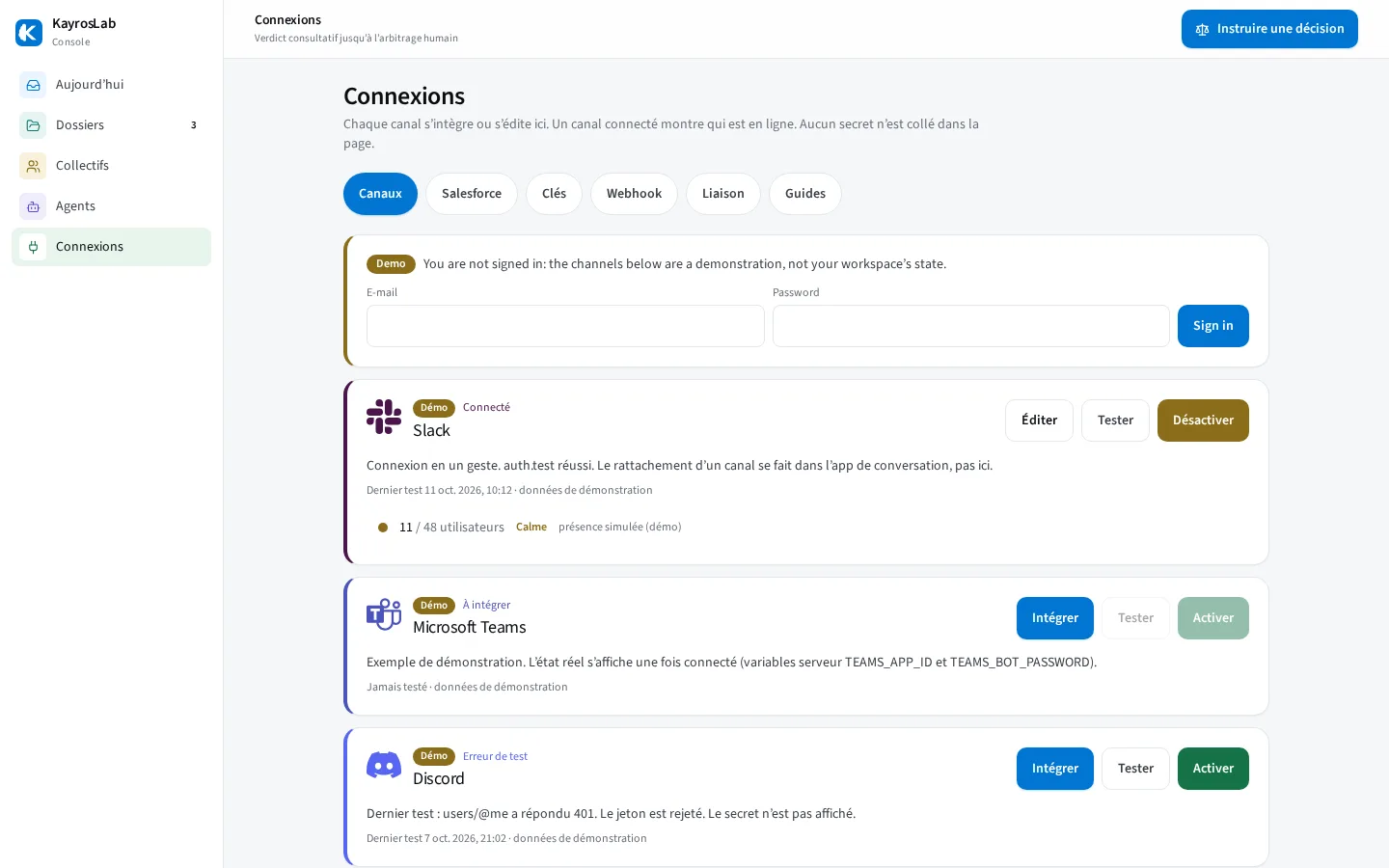

kayroslab.com/console/#connexions
KayrosLab console, Connections screen: Slack, Microsoft Teams, Discord and Salesforce channels with their status
Connections in the console: every channel — Slack, Microsoft Teams, Discord, Salesforce — is connected, tested and monitored in one place. Secrets stay in the server vault.

Ready to try it on a real decision?